Visual Basic 6 applications, migrated to the web
Visual Basic 6 programs still handle orders, production, appointments and accounts in many companies, more than twenty-five years after the last version came out. We migrate them to web applications written in C#, keeping the data and the business rules, with or without the original source code.
Why now
Microsoft stopped supporting the Visual Basic 6 development environment on 08/04/2008. The runtime still ships with Windows and is supported for the lifetime of the Windows versions that include it, Windows 11 among them, but only as a 32-bit component and only for serious regressions and critical security issues. Controls that are not part of Windows, such as MSCOMCTL.OCX, MSFLXGRD.OCX and almost every third-party OCX, have to be installed with the application and are not covered by Microsoft.
In practice the difficulty lies with people and tools. Microsoft does not support the IDE on 64-bit Windows, developers who know VB6 are fewer every year, and each replacement PC means another installation with components registered by hand.
- Visual Basic 6 development environmentEnd of Microsoft support
- Windows 10End of Microsoft support
What we migrate
The whole program, including what it relies on outside its own code.
Forms and controls
Windows with text boxes, combo boxes, grids, tabs and control arrays, including MSFlexGrid, ListView and TreeView. They become web pages that keep the layout people are used to.
Logic in modules and classes
Calculations, checks and procedures spread across .bas and .cls files and form events. We move them into server-side services covered by tests.
Data access
DAO, RDO and ADO code working against Access, SQL Server, Oracle or other databases, including SQL built by joining strings. The data moves to SQL Server or MySQL, or stays where it is when other systems depend on it.
Reports and printing
Crystal Reports, DataReport and printouts drawn line by line with the
Printerobject. Each one becomes a PDF document with the same content.COM components and DLLs
ActiveX DLLs written in-house, third-party components and Windows API calls made through
Declare. We identify each one and decide whether it is replaced, rewritten or no longer needed.Files, settings and devices
Configuration in INI files or the registry, imports from text files, and connections to scales, label printers or serial devices through MSComm. We check which of these still need something installed locally.
What the web version looks like
- Dashboard
- Calendar
- Patients
- Treatments
- Reports
| Time | Dr Valdrin | Dr Sato | Hygienist |
|---|---|---|---|
| 08:30 | L. Moreau - Check-up | A. Bianchi - Cleaning | |
| 09:00 | K. Novak - Filling | ||
| 09:30 | S. Haddad - Crown | J. Lindqvist - Cleaning | |
| 10:00 | P. Ortega - Root canal | ||
| 10:30 | E. Kowalski - Check-up | ||
| 11:00 | N. Ferri - Extraction | R. Dimitrov - Cleaning | |
| 11:30 | T. Brennan - Filling | ||
| 12:00 | C. Duval - Check-up | H. Ito - Cleaning |
An appointment book as it might look in a VB6 program on the reception PC, and the same week in the browser.
Drag the handle, or use the arrow keys.
Where each part ends up
- In VB6: Forms (.frm) and their events
- In the web application: Web pages, with the logic on the server
- In VB6: Modules (.bas) and classes (.cls)
- In the web application: C# services covered by automated tests
- In VB6: OCX controls registered on each PC
- In the web application: Standard web components, nothing to install
- In VB6: ADO or DAO recordsets
- In the web application: Parameterised queries against SQL Server or MySQL
- In VB6: Crystal Reports or DataReport
- In the web application: PDF documents produced by the server
- In VB6: A setup package for every workstation
- In the web application: One address, opened in the browser
How the migration works
Assessment within 48 hours
You send us the installed program and its database, plus the source code (.vbp, .frm, .bas, .cls) if you have it. Within 48 hours we reply with a written report: what the program does today, where the risks are, how the web version would be organised, a fixed price for a pilot module and an estimate for the rest. It is free and commits you to nothing.
Pilot module
We build one part of the application on a copy of your real data, usually the part people use most. Your staff work with it day to day before you decide on the rest.
Automated old-versus-new tests
We record what the VB6 program produces for a set of real cases, such as prices, totals and generated documents, and check the new application against those results. Each rule we find gets an automated test that gives the same input to the old program and to the new application and checks that the results match. You receive the test results.
30-day parallel run
When the full application is ready, the VB6 program stays in use alongside it for 30 days. Any difference shows up while the old program is still there, and we fix it within the agreed price.
Typical pitfalls, and how we handle them
OCX and ActiveX dependencies
Many VB6 programs rely on controls that do not ship with Windows, some from vendors that no longer exist, and Microsoft lists files such as
GRID32.OCXandTHREED32.OCXas unsupported. The assessment lists every dependency, what it does in the program and what replaces it.Variant, default properties and silent conversions
VB6 converts quietly between strings, numbers and dates, and a line such as
Text1 = rs!Totalrelies on default properties. A literal translation to C# or VB.NET behaves differently in edge cases, for example with empty fields or dates in another regional format. We rewrite these spots deliberately and cover them with tests.On Error Resume NextCommon in VB6 code, it hides failures and lets the program carry on with half-written data. Where we find it, we work out what the original author was trying to avoid and handle that case explicitly. Otherwise the new application would either stop with an error or repeat the same silent mistakes.
16-bit
Integerand roundingA VB6
Integerstops at 32,767, which is behind many overflow errors once a table grows.Currencykeeps four decimal places, andRounduses banker's rounding. We reproduce the rounding the business expects and note where the old program was getting it wrong.SQL built by joining strings
Queries assembled with
&from what the user typed are open to SQL injection and break on names with an apostrophe. In the new application every query uses parameters.Missing or outdated source code
Sometimes the source code is lost, or the copy on file does not match the program in use. A compiled VB6 program cannot be turned back into reliable source code, so we work from the running program, its database and its screens, and the assessment states which parts carry more uncertainty.
Price and payment
Assessment
Free
in writing, within 48 hours
Pilot module
€1,000–1,500
usually, paid 50% at the start and 50% on approval
The assessment is free. If you decide not to go ahead, you keep the report and owe nothing.
Prices are fixed and agreed in writing before work starts. If the scope changes, we send a new written quote and wait for your approval before doing the extra work.
For a full migration, we aim to come in 40 to 60% below a typical agency quote. We can do this because we are a small studio, with no offices to pay for and no sales team.
Prices exclude VAT.
A real migration, checked by tests
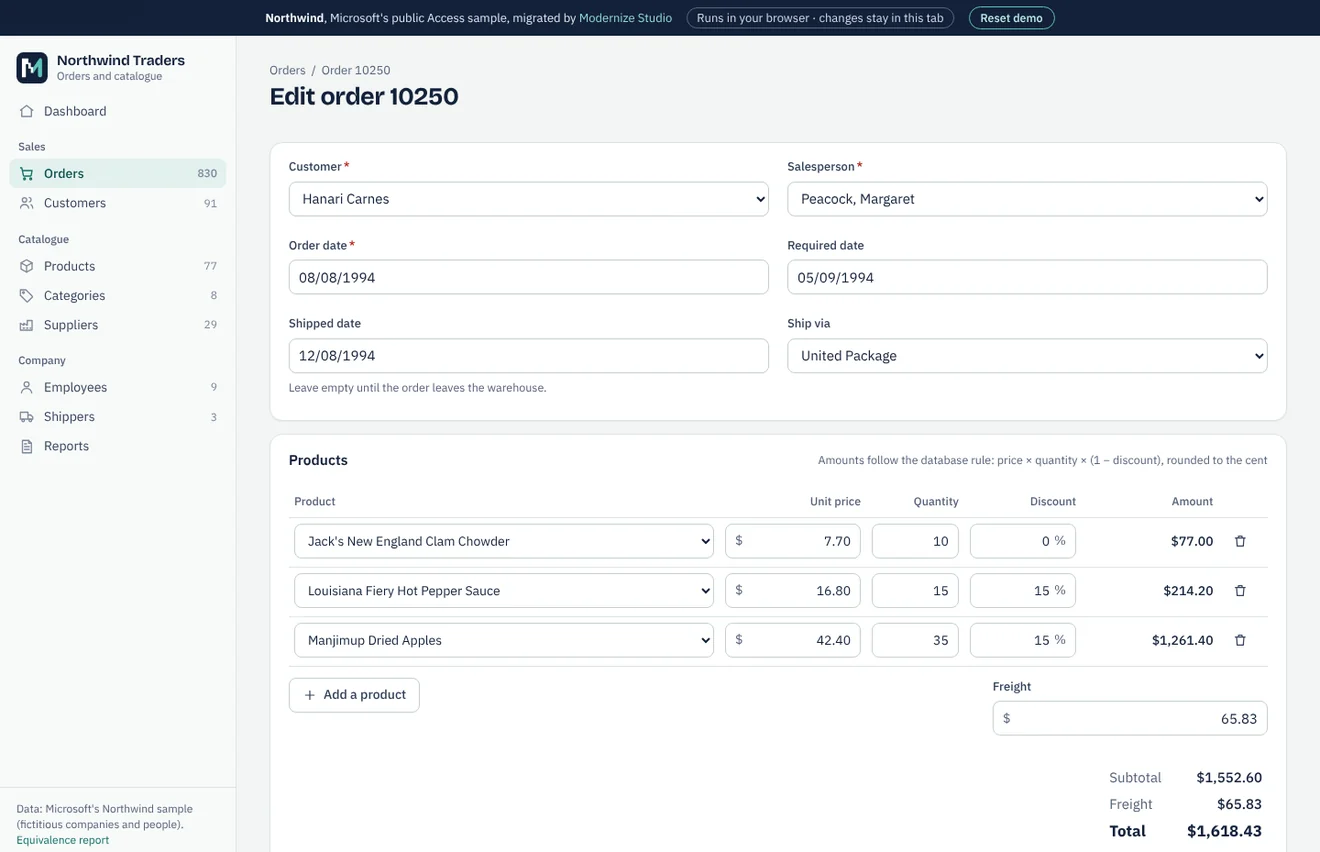
Northwind is the sample database Microsoft shipped with Access, not a client of ours. We migrated a public copy to SQLite and PostgreSQL, compared every table and every query with the original through automated tests, and built a working web application on the result. The case study gives the figures and the equivalence report lists every check.
Northwind is an Access database, but we follow the same method for Visual Basic 6: migrate, test against the original, run both side by side.
Equivalence report · Clickable preview and sample assessment (demo)
FAQ
We don't have the source code. Can you still migrate the program?
Often, yes. We work from the program in use, its database and screenshots or recordings of how people use it. The assessment states which parts we can reproduce with confidence and which need input from you.
Why not convert the code automatically to VB.NET or C#?
Conversion tools produce code that compiles, but it keeps the desktop structure, often depends on compatibility libraries and carries the old problems forward. For a web application we rebuild the screens and move the logic, using the VB6 code as the specification of what the program does.
Will our VB6 program stop working on Windows 11?
Not by itself: Microsoft supports the VB6 runtime on Windows 11. What tends to fail is everything around it, such as unregistered OCX files, lost setup packages, old database drivers and the IDE, which Microsoft does not support on 64-bit Windows.
Our program talks to a scale or a label printer. Can a web application do that?
Usually, yes, but it is the one part that may need a small program installed on the PC connected to the device. We check this during the assessment and include it in the price.
Can we migrate one part at a time?
Yes. The pilot module is the first part, and the rest can follow in stages. When possible, the VB6 program and the web application share the same database during the transition.
Which language will the new application be written in?
Usually C# with ASP.NET Core, which any .NET developer can maintain. PHP with MySQL is an option if that is what your IT provider works with.
Other services
- Microsoft Access to web applicationTables, queries, forms, reports and VBA moved to a web application on SQL Server or MySQL.
- Excel VBA to web applicationWorkbooks with macros, UserForms and linked sheets turned into a multi-user web application.
- Delphi application migrationDelphi programs on BDE, Paradox or dBase moved to a web application on a SQL database.
- Legacy .NET modernisationWinForms and ASP.NET Web Forms applications moved to ASP.NET Core, keeping what still works.
- Custom software and integrationsNew business applications, REST API integrations, data migration and maintenance.
Contact
By email:
riccardo@Send us the program and its database, with test data if you prefer, or a short description of what it does. We reply within one working day.
We work from Italy.