Delphi applications, migrated to the web
Delphi was a common choice for business software in the 1990s and 2000s, and many of those programs are still in daily use, often reading Paradox or dBase tables through the BDE. We migrate them to web applications on a SQL database, with the same data and the same rules, so you no longer need PCs configured exactly right to run them.
Why now
Embarcadero, which maintains Delphi today, has deprecated the Borland Database Engine. Its documentation states that the BDE will not be enhanced, will never support Unicode, and should not be used for new development, and it suggests moving to FireDAC. Most older Delphi programs still read and write their Paradox or dBase tables through it.
The BDE was designed for 32-bit Windows and for sharing files on a local network. Paradox tables on a shared drive depend on lock files and on BDE settings that have to be identical on every PC, and when one machine gets them wrong, tables and indexes can be damaged. Each new PC, and each move to a new Windows version, is another installation that has to be set up by hand.
- Windows 10End of Microsoft support
What we migrate
The program and the data files it depends on, whatever shape they are in.
Forms and data-aware controls
Forms from .dfm files with
TDBGrid,TDBEdit,TDBLookupComboBoxand master and detail layouts. They become web pages with the same fields and the same order of work.Paradox, dBase and InterBase data
Tables read through the BDE, or databases such as InterBase, Firebird, SQL Server and Oracle. We move the data to SQL Server or MySQL and keep keys, indexes and relationships.
Data modules and business logic
Code in
TDataModuleunits, in dataset events such asBeforePostandOnCalcFields, and in calculated and lookup fields. We gather these rules into server-side services.Reports
QuickReport, ReportBuilder, Rave Reports or FastReport layouts, including those with code in their events. They become PDF documents with the same content.
Third-party components
Grids, editors and utilities from packages such as DevExpress, TMS, InfoPower or RxLib, often tied to a single Delphi release. We check which of their features the program actually uses.
Imports, exports and scheduled jobs
Text and CSV exchanges with other systems, exports for the accountant, and programs started by the Windows Task Scheduler. They become scheduled jobs on the server.
What the web version looks like
- Dashboard
- Items1,284
- Movements
- Suppliers
- Reports
| Cable H07V-K 1.5 mm², blueEL-10215 · A-03-2 | 1,850 m | |
| Circuit breaker C16 1P+NEL-20431 · B-01-4 | 46 pcs | Below min. |
| Junction box 100×100EL-30112 · B-02-1 | 312 pcs | |
| LED panel 60×60, 36 WEL-40877 · C-05-3 | 18 pcs | Below min. |
| RCD 40 A 30 mAEL-20455 · B-01-5 | 27 pcs | |
| Conduit 20 mm, greyEL-50310 · A-07-1 | 940 m | |
| Socket outlet 16 AEL-60204 · B-03-2 | 9 pcs | Below min. |
| Code | Description | Location | In stock | Min. | Unit |
|---|---|---|---|---|---|
| EL-10215 | Cable H07V-K 1.5 mm², blue | A-03-2 | 1,850 | 500 | m |
| EL-20431 | Circuit breaker C16 1P+N | B-01-4 | 46 | 60 | pcs |
| EL-30112 | Junction box 100×100 | B-02-1 | 312 | 100 | pcs |
| EL-40877 | LED panel 60×60, 36 W | C-05-3 | 18 | 24 | pcs |
| EL-20455 | RCD 40 A 30 mA | B-01-5 | 27 | 20 | pcs |
| EL-50310 | Conduit 20 mm, grey | A-07-1 | 940 | 300 | m |
| EL-60204 | Socket outlet 16 A | B-03-2 | 9 | 40 | pcs |
A stock program as it might look in Delphi on Windows XP, and the same data in a web application.
Drag the handle, or use the arrow keys.
Where each part ends up
- In Delphi: Forms (.dfm) and units (.pas)
- In the web application: Web pages, with the logic on the server
- In Delphi: Paradox or dBase tables through the BDE
- In the web application: SQL Server or MySQL, with keys and relationships
- In Delphi: Calculated and lookup fields
- In the web application: Calculations and joins in the database or the services
- In Delphi: BDE aliases and settings on every PC
- In the web application: One connection, configured on the server
- In Delphi: QuickReport or FastReport layouts
- In the web application: PDF documents produced by the server
- In Delphi: A network drive shared by all users
- In the web application: Concurrent access managed by the database
How the migration works
Assessment within 48 hours
You send us the program with its data folder (Paradox or dBase files, or a database backup), plus the source code (.dpr, .pas, .dfm) if you have it. Within 48 hours we reply with a written report: what the program does today, where the risks are, how the web version would be organised, a fixed price for a pilot module and an estimate for the rest. It is free and commits you to nothing.
Pilot module
We build one part of the application on a copy of your real data, usually the part people use most. Your staff work with it day to day before you decide on the rest.
Automated old-versus-new tests
We put the same records through the Delphi program and the new application and compare stock levels, totals and printed documents. Each rule we find gets an automated test that gives the same input to the old program and to the new application and checks that the results match. You receive the test results.
30-day parallel run
When the full application is ready, the Delphi program stays in use alongside it for 30 days. Any difference shows up while the old program is still there, and we fix it within the agreed price.
Typical pitfalls, and how we handle them
How the BDE and Paradox behave
Paradox tables rely on lock files, on a shared network control file (
PDOXUSRS.NET) and on BDE settings such asLOCAL SHAREthat must match on every PC. Damaged indexes and “Table is busy” errors are common. Before migrating, we repair what can be repaired and report the records that cannot be read.Character encoding
The BDE stores text in a code page set by the table's language driver, while Delphi 2009 and later use Unicode strings. Accented letters and symbols are where a migration usually goes wrong, so we check the encoding of each table and compare samples of the converted text with you.
Logic hidden in dataset events
Rules in
BeforePost,OnValidateorOnCalcFieldsrun silently whenever a record is saved or displayed, and they are easy to miss if you only look at the forms. We search the code for every event handler and list the rules they enforce.Calculated and lookup fields
Fields that exist only in the program, not in the tables, appear on screen and in reports as if they were stored data. We reproduce them as calculated values and check them against the originals.
Components without source code
Some third-party packages were bought as compiled units for one Delphi version. If the program relies on one for a calculation rather than for display, we reconstruct its behaviour from the results and confirm it in the comparison tests.
Dates and number formats
Paradox and dBase date fields, two-digit years entered long ago and decimal separators that depend on Windows regional settings all need explicit handling when the data moves to a SQL database. We list the anomalies found during the import and resolve them with you.
Price and payment
Assessment
Free
in writing, within 48 hours
Pilot module
€1,000–1,500
usually, paid 50% at the start and 50% on approval
The assessment is free. If you decide not to go ahead, you keep the report and owe nothing.
Prices are fixed and agreed in writing before work starts. If the scope changes, we send a new written quote and wait for your approval before doing the extra work.
For a full migration, we aim to come in 40 to 60% below a typical agency quote. We can do this because we are a small studio, with no offices to pay for and no sales team.
Prices exclude VAT.
A real migration, checked by tests
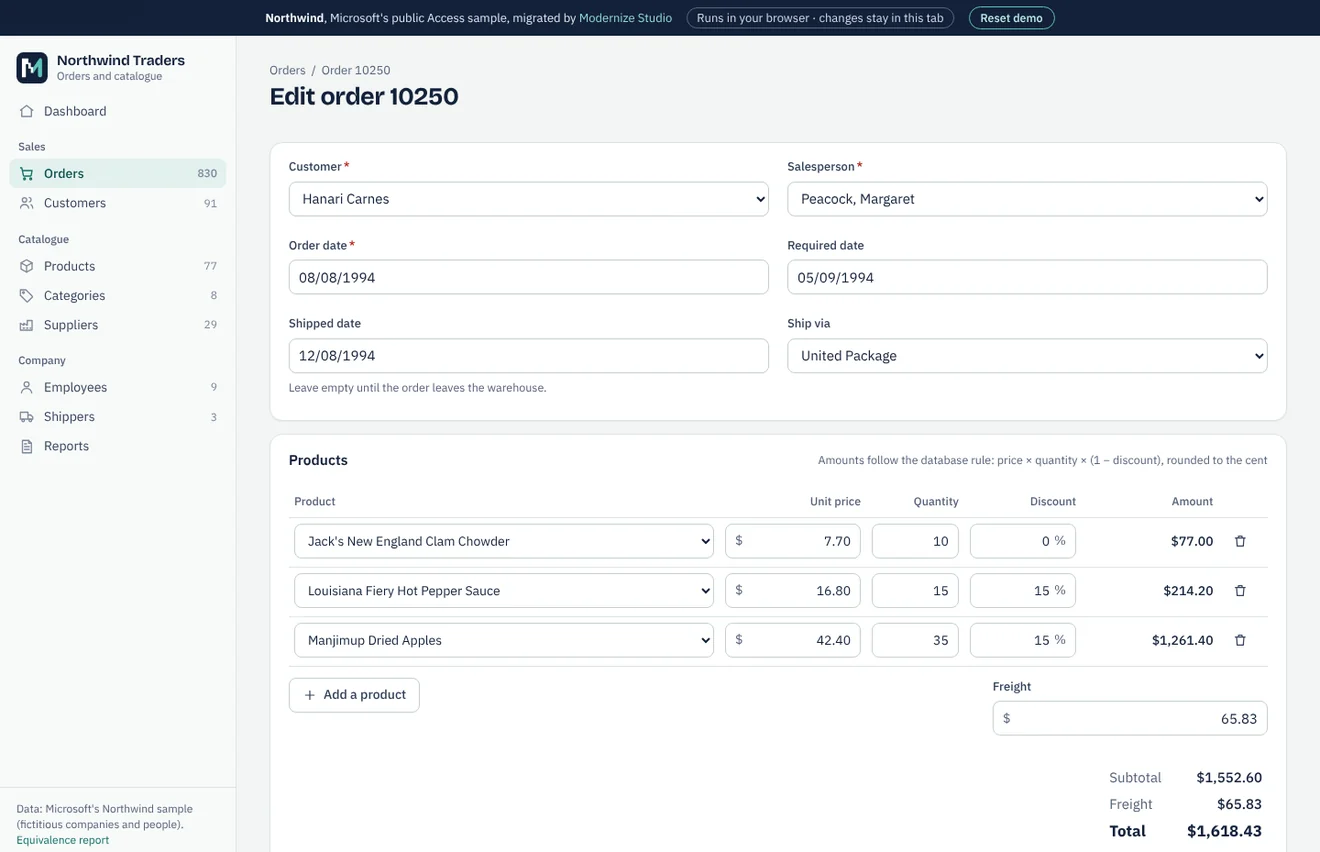
Northwind is the sample database Microsoft shipped with Access, not a client of ours. We migrated a public copy to SQLite and PostgreSQL, compared every table and every query with the original through automated tests, and built a working web application on the result. The case study gives the figures and the equivalence report lists every check.
Northwind is an Access database, but we follow the same method for Delphi: migrate, test against the original, run both side by side.
Equivalence report · Clickable preview and sample assessment (demo)
FAQ
Our Delphi program uses Paradox tables on a network drive. Can you migrate the data?
Yes. We read the Paradox or dBase files directly, convert them to SQL Server or MySQL and compare record counts and totals before and after. Damaged records are reported to you, not silently dropped.
Could we simply move to a newer version of Delphi instead?
That is an option, and for some programs it is the sensible one: the application stays a Windows program, FireDAC replaces the BDE and the code is brought up to date. If you need access from any browser and nothing to install on each PC, a web application is the better fit. When both make sense, the assessment compares them.
We don't have the source code. Is that a problem?
Not necessarily. We can work from the program in use, its data files and recordings of how people use it. With the source code the assessment is more precise, and where information is missing we say so.
Which Delphi versions do you work with?
Programs written with anything from the early Borland releases of the 1990s to current Embarcadero versions. The version matters mainly for string handling and for the components available, and we note it in the assessment.
Can the web application keep using our Firebird or InterBase database?
Yes, if other programs still depend on it. The web application then connects to the same database, and a change of database can happen later, or not at all.
What happens during the 30-day parallel run?
Your staff keep the Delphi program at hand while they work in the new application, so they can check results on real work. Any difference we find in that period is fixed within the agreed price.
Other services
- Microsoft Access to web applicationTables, queries, forms, reports and VBA moved to a web application on SQL Server or MySQL.
- Excel VBA to web applicationWorkbooks with macros, UserForms and linked sheets turned into a multi-user web application.
- VB6 application migrationVisual Basic 6 programs moved to C# and the web, with or without the source code.
- Legacy .NET modernisationWinForms and ASP.NET Web Forms applications moved to ASP.NET Core, keeping what still works.
- Custom software and integrationsNew business applications, REST API integrations, data migration and maintenance.
Contact
By email:
riccardo@Send us the program and its data folder, with test data if you prefer, or a short description of what it does. We reply within one working day.
We work from Italy.