Microsoft Access databases, rebuilt as web applications
We take the Access database your company depends on, with its tables, queries, forms, reports and VBA code, and rebuild it as a web application backed by SQL Server or MySQL. The data comes across intact and the screens follow the way your staff already work, so nobody has to learn a new process.
Why now
Microsoft support for Access 2021, together with the rest of Office 2021, ends on 13/10/2026. Access 2016 and Access 2019 lost support on 14/10/2025, the same day as Windows 10. An Access file does not stop opening on those dates, but it no longer receives security fixes, and each new Windows or Microsoft 365 build is one more chance for a broken reference, an ActiveX control that stops loading or a 32-bit driver that is missing.
More often the reason to move is practical. The file sits on a shared drive, one or two people understand how it works, it cannot be used from outside the office without a remote desktop, and it is getting close to the 2 GB limit of an Access file.
- Windows 10, Access 2016 and Access 2019End of Microsoft support
- Access 2021 and Office 2021End of Microsoft support
What we migrate
Everything that makes the database work, not only the tables.
Tables and relationships
Data types, primary keys, indexes, relationships with referential integrity, validation rules and default values. AutoNumber fields become identity columns and keep their existing values, so invoice and order numbers do not change.
Queries
Select, append, update, delete and crosstab queries, including those that read values from open forms. Each one is rewritten for the new database and checked against the results of the original.
Forms and subforms
Data entry screens, continuous forms, combo boxes with dependent lists, master and detail layouts. They become web pages with the same fields in the same order.
Reports
Grouped reports with totals and page breaks, labels, and the documents you print or send as PDF, such as invoices and delivery notes.
VBA modules and macros
Code behind forms, standard modules, AutoExec and embedded macros. Business rules move to the server, where they apply in the same way to every user.
Linked tables and external data
Links to other Access files, Excel sheets, ODBC sources and SharePoint lists, and the import or export routines someone runs every week.
What the web version looks like
- Dashboard
- Job cards312
- Customers1,148
- Vehicles
- Parts
- Invoices
Annual service. Front brake pads. Check air conditioning.
| Part | Qty | Price | Amount |
|---|---|---|---|
| Oil filter | 1 | €14.90 | €14.90 |
| Engine oil 5W-30 (l) | 4.5 | €11.20 | €50.40 |
| Front brake pads | 1 | €64.50 | €64.50 |
| Air filter | 1 | €18.60 | €18.60 |
| Labour (h) | 2.5 | €54.00 | €135.00 |
| Total | €283.40 | ||
| Part | Qty | Price | Amount |
|---|---|---|---|
| Oil filter | 1 | €14.90 | €14.90 |
| Engine oil 5W-30 (l) | 4.5 | €11.20 | €50.40 |
| Front brake pads | 1 | €64.50 | €64.50 |
| Air filter | 1 | €18.60 | €18.60 |
| Labour (h) | 2.5 | €54.00 | €135.00 |
A garage job card as it might look in Access 97, and the same screen as a web application.
Drag the handle, or use the arrow keys.
Where each part ends up
- In Access: Tables in the .accdb or .mdb back end
- In the web application: Tables in SQL Server or MySQL, with the same keys and relationships
- In Access: Saved queries
- In the web application: Views, stored procedures or queries in the application
- In Access: Forms and subforms
- In the web application: Web pages with the same fields, in any browser
- In Access: Reports
- In the web application: Printable pages and PDF files produced by the server
- In Access: VBA in form events
- In the web application: Checks and rules that run on the server
- In Access: A workgroup file (.mdw), or no logins at all
- In the web application: Personal logins with roles, and a record of who changed what
How the migration works
Assessment within 48 hours
You send us a copy of the .mdb or .accdb file (front end and back end, if the database is split), with test data in place of real records if you prefer. Within 48 hours we reply with a written report: what the program does today, where the risks are, how the web version would be organised, a fixed price for a pilot module and an estimate for the rest. It is free and commits you to nothing.
Pilot module
We build one part of the application on a copy of your real data, usually the part people use most. Your staff work with it day to day before you decide on the rest.
Automated old-versus-new tests
We run the queries and reports on the new database and compare record counts, totals and printed figures with the Access originals. Each rule we find gets an automated test that gives the same input to the old program and to the new application and checks that the results match. You receive the test results.
30-day parallel run
When the full application is ready, the Access database stays in use alongside it for 30 days. Any difference shows up while the old program is still there, and we fix it within the agreed price.
Typical pitfalls, and how we handle them
Jet and ACE SQL is not standard SQL
Access uses
*and?as wildcards inLIKEwhere SQL Server and MySQL use%and_, writes dates between#signs and storesTrueas -1. Functions such asIIf,Nz,FormatandDateSerialhave no direct equivalent. Copying the SQL text across gives queries that fail or, worse, return different rows. We translate each query and compare its results with the original.Domain functions in loops and queries
DLookup,DCountandDSumare convenient, but each call runs a separate query. In a continuous form or inside another query they can run thousands of times for a single screen. In the web version they become joins and grouped queries that the database server resolves in one pass.Queries that read from open forms
A criterion such as
[Forms]![frmOrders]![txtCustomerID]only works while that form is open on that PC. We turn these references into parameters, so the same query can serve any page or report.Yes/No, Currency and Date/Time fields
Access stores Yes/No as 0 and -1, Currency with four decimal places, and dates as numbers that can also carry a time. Moved without care, totals drift by a few cents or a filter on 31/03 returns nothing. We map each field type explicitly and compare totals after every transfer.
Attachment, multivalued and lookup fields
These field types exist only in the .accdb format and hide extra tables behind the scenes. We turn them into ordinary related tables, and attachments into stored files referenced from the database.
A front end copied to every PC
Many databases depend on a copy of the front end on each desk, sometimes in different versions, with paths to the back end on a mapped drive. During the assessment we establish which copy is the current one and which paths, printers and add-ins the code expects.
Price and payment
Assessment
Free
in writing, within 48 hours
Pilot module
€1,000–1,500
usually, paid 50% at the start and 50% on approval
The assessment is free. If you decide not to go ahead, you keep the report and owe nothing.
Prices are fixed and agreed in writing before work starts. If the scope changes, we send a new written quote and wait for your approval before doing the extra work.
For a full migration, we aim to come in 40 to 60% below a typical agency quote. We can do this because we are a small studio, with no offices to pay for and no sales team.
Prices exclude VAT.
A real migration, checked by tests
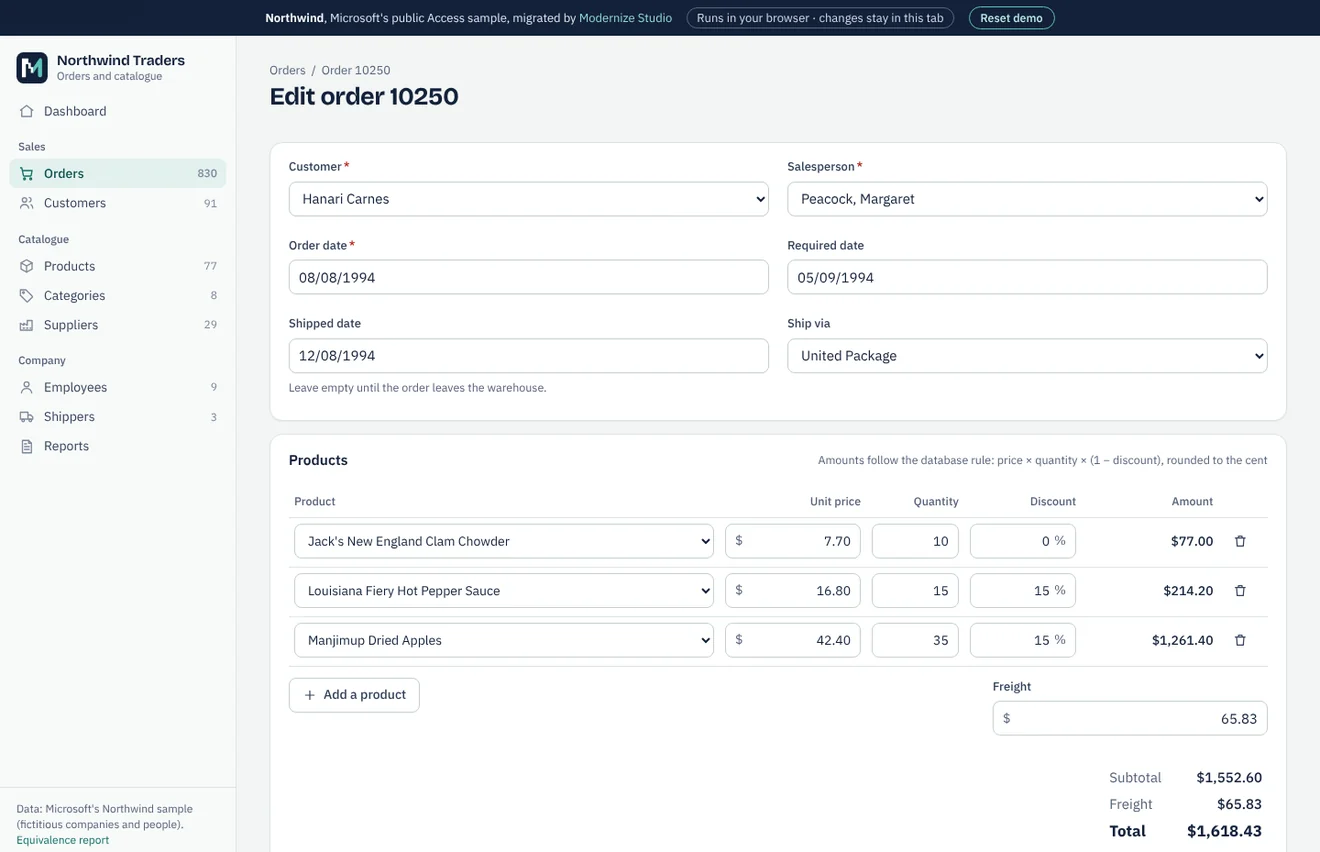
Northwind is the sample database Microsoft shipped with Access, not a client of ours. We migrated a public copy to SQLite and PostgreSQL, compared every table and every query with the original through automated tests, and built a working web application on the result. The case study gives the figures and the equivalence report lists every check.
Equivalence report · Clickable preview and sample assessment (demo)
FAQ
Can we keep using Access while the web version is being built?
Yes. You keep working in the database as usual. Before go-live we transfer the data again from the latest copy, and the database stays in use for 30 days alongside the new application.
Could we keep the Access forms and move only the data to SQL Server?
Yes, and for some companies that is the right first step: the tables move to SQL Server and the Access front end links to them. It solves problems of size and stability, but not remote access or the dependency on Office. The assessment says which option suits your case.
Our database is an .mdb from Access 97 or 2003. Is that a problem?
No. We work with both .mdb and .accdb files. If user-level security was set up in an old .mdb, we will also need the workgroup file (.mdw), and we tell you before you send anything.
What happens to our reports?
Each report is rebuilt as a page that can be printed or saved as PDF, with the same groupings and totals. The comparison tests check the figures in the new reports against the Access ones.
How many people can use the web version at the same time?
That depends on the database server rather than on the application, and SQL Server or MySQL handle many more concurrent users than a shared Access file. The assessment recommends hosting suited to your number of users.
Where will the application run?
On a server or cloud service of your choice, or on hosting we arrange for you. We use common technologies, C# with ASP.NET Core or PHP with MySQL, so your IT provider can take over its day-to-day running.
Other services
- Excel VBA to web applicationWorkbooks with macros, UserForms and linked sheets turned into a multi-user web application.
- VB6 application migrationVisual Basic 6 programs moved to C# and the web, with or without the source code.
- Delphi application migrationDelphi programs on BDE, Paradox or dBase moved to a web application on a SQL database.
- Legacy .NET modernisationWinForms and ASP.NET Web Forms applications moved to ASP.NET Core, keeping what still works.
- Custom software and integrationsNew business applications, REST API integrations, data migration and maintenance.
Contact
By email:
riccardo@Send us a copy of the database, with test data if you prefer, or a short description of what it does. We reply within one working day.
We work from Italy.